How I built a private family tree website: 8 generations, Arabic first, privacy built in
My family's tree lived in an Excel file: 168 people across 8 generations, names in Arabic, branches spread over Lebanon and abroad. Nobody could read it on a phone, and nobody wanted to share phone numbers or photos in a file that gets forwarded around. So I turned it into a private family tree website. Here is what it does, how the privacy works, and what it took to build.
What the family needed
- Find yourself in seconds. Older relatives don't browse trees. They want to type a name, or answer "whose son are you?", and land on their own branch.
- Arabic first. Names written the way the family writes them, a right-to-left layout, and English for the younger generation abroad.
- Privacy that people trust. Phone numbers and photos of women and girls must never be public, and only family should be able to change the tree.
- A reason to come back. A tree you look at once is forgotten. Birthdays, photos and memories keep a family site alive.
What the website does
- "Find yourself" welcome. Pick your father's side or your mother's side, find your name, tap "That's me" and ask to join.
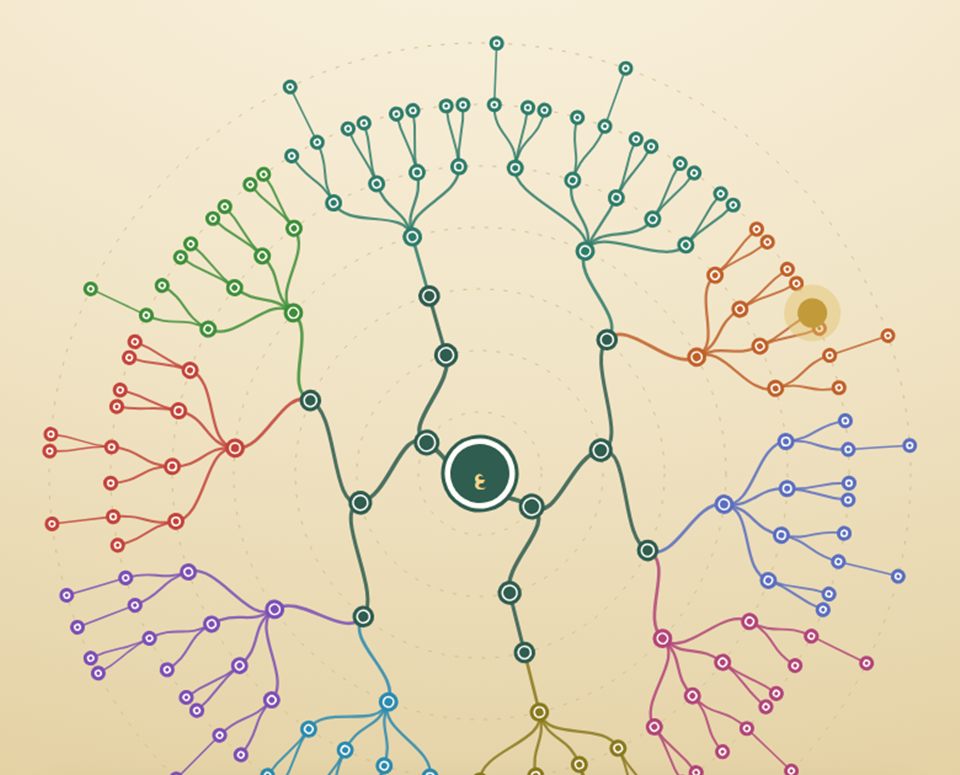
- Two views. A classic tree with branches you can fold and unfold, and a circle view where the whole family fits on one screen. Both can be exported as a poster to print.
- Requests, not free editing. Members ask to add a child, a photo or details; family admins approve each request before it changes the tree.
- A family corner. Group chat, a photo album, "how are we related?" between any two people, upcoming birthdays with a one-tap WhatsApp wish, and memories with photos and short voice notes about grandparents.
- Greeting cards. Ready cards for Fridays, Ramadan and Eid (dates from the Islamic calendar, calculated in the browser), Mother's Day and members' birthdays, to share on WhatsApp or Facebook.
- Three languages. Arabic, English and German, switched with one button, with relationship words that make sense in each language.
How the privacy works
Hiding a button is not privacy: anyone can open the browser tools and read what the page downloaded. So every rule lives on the server, in the database's security rules, and the page only receives what the person is allowed to see.
- Visitors see names and the shape of the tree, nothing else.
- Signed-in relatives (Google sign-in, no new password) can ask to join and say which person they are.
- Verified members, approved by a family admin, also get phone numbers, birthdays, the album, the chat and the photos of women and girls.
- Admins approve members and changes; only the owner can add or remove admins.
The site is also marked so search engines don't index it, and the page counter I use records no personal data.
The technology
- One fast web page that works on any phone, no app to install.
- D3.js to draw the tree and the circle view, with zoom, search and folding branches.
- Firebase: Google sign-in, a Firestore database and the security rules described above.
- Canvas to draw the greeting cards and the printable poster right in the browser.
- A one-time import from the Excel sheet, with checks for duplicate names, missing fathers and spelling differences.
It costs almost nothing to run for a family of this size.
Built with AI coding agents
I built it with Claude Code, an AI coding agent, which wrote most of the code while I decided what to build, set the privacy rules and tested every step on real phones. That is how one person can ship a site with chat, roles, three languages and greeting cards in days instead of weeks. The AI is fast; the judgement about who sees what stays human. I describe my setup in How I use AI coding agents.
What I learned
- Start from how people search, not from the data. "Whose son are you?" works better than a search box for older relatives.
- Requests beat open editing. Families care about accuracy; an approval step stops mistakes and arguments.
- Arabic names need care. Compound names, different spellings and Latin versions all have to match the same person.
- Test on real phones. The phone Back button, small screens and slow connections behave differently from a laptop.
Want one for your family?
The same approach works for any family, village association or alumni group that wants a private tree or member directory in Arabic and English. If you already have a list or an Excel sheet, that is enough to start. See my website development service or message me below.
FAQ
Can strangers see my family's phone numbers and photos?
No. Visitors only see names and the shape of the tree. Phone numbers, birthdays and the photos of women and girls are only sent to verified family members, and the server enforces that, not just the page. The site is also hidden from Google.
Does a family tree website work in Arabic?
Yes. This one is Arabic first, with a right-to-left layout and names stored in Arabic and Latin letters, and it switches to English or German with one tap.
Can you build one from our Excel sheet?
Yes. If your family already keeps a list with each person and their father, I can import it, check it for mistakes and give you a private tree with your own admins.
Planning an app or a website?
Send a few lines about what you need. I reply within one working day with questions or a first estimate.